
I just got started in woodworking and would like to get rid of the whiteout,minimize mistakes and improve accuracy. Sketch seems to be what a lot of woodworker recommend. My question; does the free version of sketchup have enough functionality to design and print projects for around the home. i.e desk, workbench etc. I have no objecton to future investment for the pro version, once my experience/projects dictate the need.
thanks








Replies
Hi Anthony,
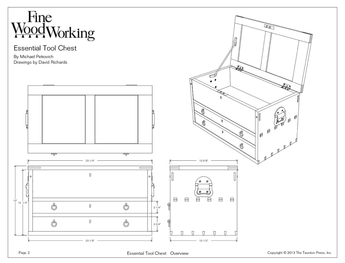
Yes, the free version of SketchUp has the capability to allow you to draw your projects and then print them. You can create dimensioned drawings to take to the shop if you need, as well.
The pro version gives you a few more tools, mostly the Solid Tools, as well as some additional import and export options. The big addition when you step up to the pro version, though, is LayOut. This program works in concert with SketchUp to allow you to make very nice presentation packages and plans. The dimensioning and text tools are more capable and give you more options than those in SketchUp. LayOut also makes it easy to create full size patterns and templates.
Even if you decide you want the pro version later, starting with the free version is a good way to go while you're learning.
--Dave
By the way, you might find this video helpful to get you started. There's a DVD or a downloadable version.
Do You Know an Online Tutorial
on using Layout to print fill size patterns and templates?
Tim did something awhile back. Take a look here: https://www.finewoodworking.com/item/45175/making-a-full-size-template-in-layout
This forum post is now archived. Commenting has been disabled