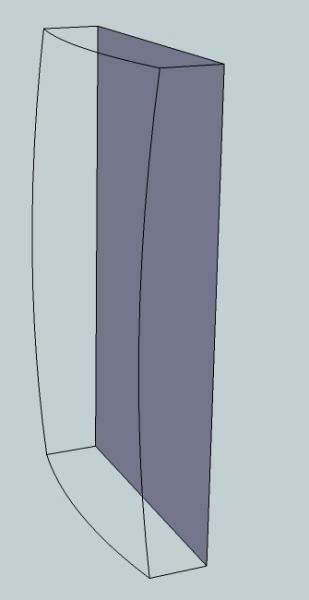
How can I make the attached a solid? After I create the solid and then draw the curved chamfer the object looses its solid attribute. I’m really stuck on this one. I can’t cut with Follow Me due to its double curve.
I…
1. create a solid retangle
2. group
3. draw the chamfer
4. erase (and loose the solid). I’ve tried groping, ungrouping, and various other things, but I always loose the solid.
Thanks for help in advance!









Replies
By chamfer, do you mean the curved surface that's not there? That's what it looks like to me, anyway.
First, it may help to understand that you aren't actually creating solids. They are hollow boxes. Think of atarting with a cardboard box, drawing curves on the sides and then cutting along those curves. When you separate the pieces on either side of the cut lines, you are left with a hole--no face.
To create a skin over the curved area, there a several plugins that will make it easy or you can do it manually. One manual method would be to create a shape whose surface matches what you want on the final block. Then intersect that shape with the box and delete all of the waste. If you want to use a plugin to create the skin, you could use the Extrude Tools or Soap Skin Bubble. There are several others as well. If you don't have these plugins let me know and I can point you to them.
Dave
Soap Skin Bubble
Dave,
Thanks much - Soap Skin did the job! It took a few trys, but I did get it and it created a solid which I can now dado and mortise, etc...
I was really stuck - thanks much!
Ah. Glad that worked. Keep plugging away and you'll have it all.
By the way, if you want to send me the SKP file, I'll show you how to do exactly what you want.
This forum post is now archived. Commenting has been disabled