
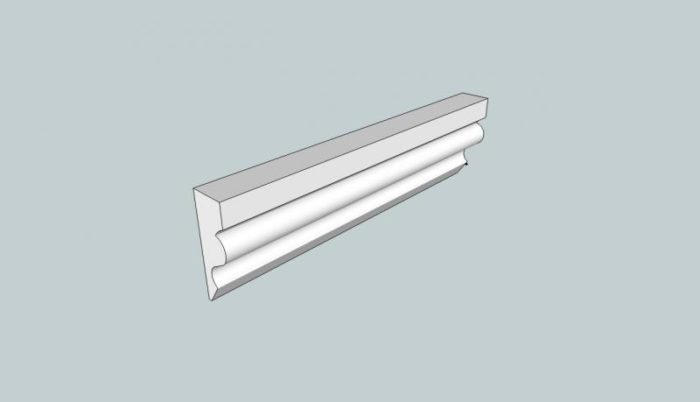
I am modeling an interior room in my home in Sketchup. I wish to add a chair rail for effect in the room. I have modeled a chair rail molding. I am adding the chair rail to a model of a room. I do not wish to use the follow me tool because of interuptions on the wall. My question is how can I add a 45 degree angle to the end of the chair rail where it will intersect with a chair rail on the wall it is mating with. I have separate chair rails on each wal that are components. The components are unique because of length.
I have attached an image of the chair rail to this post..
Thanks,
Larry











Replies
Larry, this would be an application for a cutting plane. Draw the cutting plane at the miter angle. Draw it inside the component then select the plane and the molding, right click and choose Intersect Faces>With Selected. Delete the cutting plane edges and the waste end of the cut. Correct the face orientation if you have the back face out.
If I were creating the chair rail, I would make one component with the mitered ends and make unitque copies which would be stretched with the Move tool as needed to fit the other spaces. (Essentially what I demonstrated in my most recent blog entry.) Actually I suppose you'd have several different molding components with the various miter options on the ends.
This forum post is now archived. Commenting has been disabled