
I have not figured out how to draw compound curves such as the legs and carcass of the cabinet in the photo.
How would one go about it?
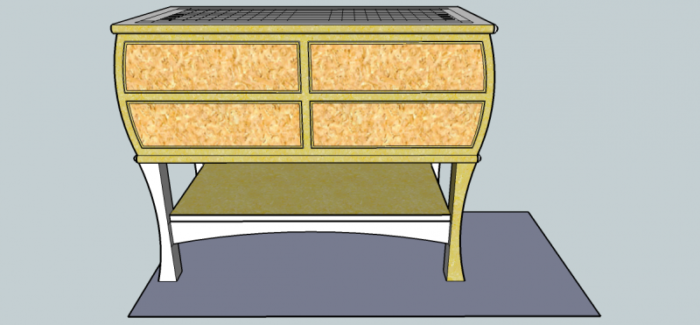
The sketchup drawing is my attempt but I had to draw the cabinet with the front flat not curved.
Thanks,
Bret
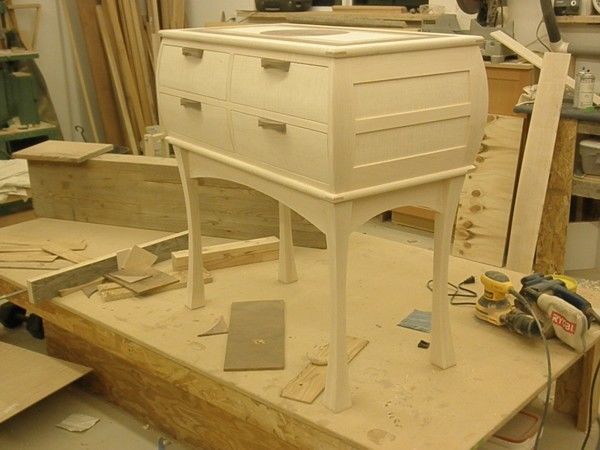
I have not figured out how to draw compound curves such as the legs and carcass of the cabinet in the photo.
How would one go about it?
The sketchup drawing is my attempt but I had to draw the cabinet with the front flat not curved.
Thanks,
Bret
Get It All!
UNLIMITED Membership is like taking a master class in woodworking for less than $10 a month.
Start Your Free Trial









Replies
Curves
Bret, does the front bow out from side to side or is it straight? From the photograph it looks straight. If that is the case, you can draw a curved profile to one side of the case and push it through so it cuts off the front of the case. Imagine the path of a huge bull-nose cutter sweeping across the front of the case. Then use Intersect to intersect that shape with the case. Delete the waste and you're done.
It's more detailed than that but that's the basics. More detail coming. I have to leave for work.
Dave
Front and side are both rounded
Thanks for the reply. I am familiar with and use the technique you described. The problem I have its trying to bring the curve of the perpendicular face to the corner of the other curved face. The program doesn't seem to know what to do at that point.
The chest is curved top to bottom on all four sides (photo).
My sketchup drawing shows the front flat because I could not make it work with a curve.
The attached photo shows a compound curved corner.
Thanks, Bret
Hey, I figured it out!
I read up on the Follow Me tool.
Draw the profile, select a path, use follow me. Simple once you figure it out.
Thanks for responding anyway.
This thread turned out to be "me thinking out loud"
Bret
Follow Me works if you want the same curve and you aren't splitting the case into its component parts. What I was describing would work for either way of drawing the case. In the interest of time, I didn't break the case into its component parts for the illustrations.
In the first of the illustrations I have the case with the curved ends and I've drawn the front profile off to the right.
Extrude the profile across the front of the case. Select all, right click and choose Intersect>Intersect Selected.
Delete the waste and correct the face orientation as needed.
This method is useful for a number of things. Tim Killen uses essentially the same process for drawing Cab legs. I think of it as the cutter as I described before. If you were making this cut on real wood, you would start the cutter in motion before you contact the wood.
To do this with the parts of the case as separate components, I would extrude the shape across the assembled cabinet. Then I would cut it with Ctrl+X. this would put that shape on the clipboard. Then I would open the affected components in turn to edit them. Use Edit Paste in Place to paste a copy of the extrusion, select everything inside the component and run Intersect. Then delete the waste and correct the face orientation.
Of course with the Pro version of SketchUp 8, this would all be much faster with the Trim tool. You would make a component or group of the extrusion and use it to trim the other compnoents.
Thanks Dave, good info
Youv'e just help me double my capabilities with Sketchup. Very cool what you did with my cabinet.
Thanks agian, Bret
That's nice to read. You're
That's nice to read. Now what do we need to do to double it again?
You're very welcome, too.
Dave
This forum post is now archived. Commenting has been disabled